1. Architectural Internals
1.1 The Binary Space Partitioning (BSP) Model
At its core, bspwm differs fundamentally from dynamic tilers (like i3, dwm, or xmonad) because it maps windows directly to the leaves of a full binary tree. There are no “lists” or “stacks” of windows; there is only the tree.
The node_t Structure
Understanding bspwm requires understanding the C structure that represents every node. A node is the atomic unit of the window manager.
- Internal Nodes: These are purely structural. They do not hold windows. Their sole purpose is to define a region of space and how it is split.
- Properties:
split_type(Horizontal or Vertical),split_ratio(0.0 to 1.0, default 0.5),first_child(pointer),second_child(pointer).
- Properties:
- Leaf Nodes: These are the containers for actual X11 windows.
- Properties:
client(Window ID),vacuity(Occupied or Empty/Receptacle).
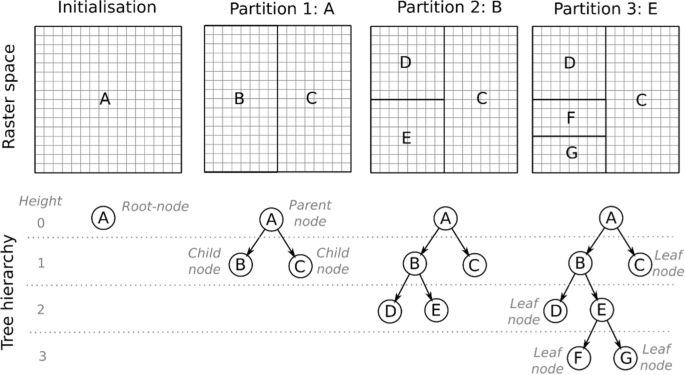
BSPWM Binary Tree Structure When you “move” a window in bspwm, you are actually performing tree rotation or swapping pointers in this linked structure.
- Properties:
1.2 The IPC Architecture (Inter-Process Communication)
bspwm itself is a daemon that does not read a configuration file at runtime. It opens a Unix domain socket and waits for byte-stream commands.
- The Daemon (
bspwm): Sits in an event loop (usingselectorepoll), listening for two things simultaneously:
- X11 Events:
MapRequest,DestroyNotify,EnterNotify(from the X server). - Socket Messages: Commands from
bspc.
- The Client (
bspc): A lightweight binary that connects to the socket, sends a null-terminated string (e.g.,node\0-f\0west\0), waits for a response, and prints it to stdout. Implication: Yourbspwmrcis just a shell script that spamsbspccommands to the socket. Ifbspcfails,bspwmremains completely unconfigured (black screen).
2. The bspc Command language
bspc is not just a controller; it is a query language. Almost every command follows the pattern: bspc <DOMAIN> <ACTION> <SELECTOR>.
2.1 Selectors and Descriptors
A selector uniquely identifies a node, desktop, or monitor.
Syntax: [REFERENCE#]DESCRIPTOR(.MODIFIER)*
- Reference: The starting point. Defaults to
focused. You can set it arbitrarily:0x00200005#...starts the search from window0x00200005. - Descriptors:
- Directional:
north,south,east,west. - Cyclic:
next,prev(follows the tree traversal order). - Genealogical:
parent,brother,first_child,second_child,ancestor,descendant. - History:
last(last focused),older,newer.
- Directional:
- Modifiers: Filters that refine the selection.
.local(same desktop),.leaf(ignore internal nodes),.floating,.tiled.!: Negation..!hiddenmeans “not hidden”. Example: “Focus the first non-hidden floating window on the current desktop.”
bspc node -f .floating.!hidden.local.first
2.2 Path Selectors (@)
You can address nodes by their path from the root of the tree.
@/: The root of the current desktop.@/1: The first child (left/top) of the root.@/2: The second child (right/bottom) of the root.@/2/1: The first child of the second child of the root. This is useful for scripts that need to traverse the tree deterministically.
3. Command Reference
3.1 Node Operations (bspc node)
- Insertion (
-i): Inserts a “receptacle” (empty leaf) at the given split.bspc node -icreates a blank space where you can later dump a window.
- Preselection (
-p): Marks a node to be split in a specific way for the next window.bspc node -p south -o 0.75: “The next window will open in the bottom 25% of this node.”
- Flags (
-g):hidden: Removes the window from the tree layout but keeps it in memory (minimized).sticky: Keeps the window visible across all desktop switches on that monitor.private: Bspwm will try not to split this node.marked: Tags a node for batch operations.
3.2 Desktop & Monitor Operations
- Reordering:
bspc monitor -o I II III IVreorders desktops. - Swapping:
bspc desktop -s prevswaps the current desktop with the previous one. - Bubbling:
bspc desktop -b next“bubbles” the desktop (moves it one slot over in the list).
3.3 The Query System (bspc query)
This is the most powerful tool for scripting.
bspc query -T: Dumps the entire world state (monitors -> desktops -> nodes) as a JSON object.bspc query -N: Lists node IDs.- Use Case: Count windows on current desktop:
bspc query -N -d focused -n .leaf.!hidden | wc -l
4. Advanced Logic & Scripting
4.1 External Rules
Bspwm allows you to offload window placement logic to an external script. This is defined by external_rules_command.
How it works:
- A new window appears.
- Bspwm pauses.
- It calls your script with arguments:
WindowID,Class,Instance. - Your script prints key-value pairs to stdout (e.g.,
state=floating,desktop=^3). - Bspwm applies these settings before mapping the window. Example Script:
#!/bin/sh
wid=$1
class=$2
instance=$3

# Float all "Save As" dialogs
if [ "$class" = "Gtkwave" ] && [ "$instance" = "file_chooser" ]; then
    echo "state=floating"
    echo "center=on"
fi
4.2 State Restoration (Layouts)
Because the state is purely data (JSON), you can save and restore layouts.
- Save:
bspc query -T -d > layout.json. - Restore: A script is needed to parse this JSON. It would iterate through the tree, using
bspc node -ito create receptacles in the exact structure of the saved tree, and then launch applications to fill those receptacles.
4.3 The Subscriber (bspc subscribe)
For status bars (like Polybar) or event-driven scripts.
bspc subscribe report streams a continuous string describing the state:
W:m:DP-0:O:I:f:II:o:III:m:HDMI-0:o:IV:o:V
W: Start of report.m:DP-0: Monitor DP-0.O:I: Desktop I is Occupied.f:II: Desktop II is Free (empty).F:III: Desktop III is Focused. This allows bars to update instantly without polling.
5. Event Flow: A Step-by-Step
When you press Super + Enter (Terminal):
- X Server receives KeyPress.
- sxhkd (listening for keys) matches
super + Return. - sxhkd executes
$TERMINAL(e.g., Alacritty). - Alacritty starts and asks X11 for a window (
CreateWindow). - X Server sends
MapRequestto bspwm. - bspwm intercepts:
- Runs
external_rules_command. - Consults the
bspwmrcrules (bspc rule -a ...). - Finds the “insertion point” (focused node or preselection).
- Splits the tree node.
- Resizes existing windows.
- Runs
- bspwm grants the MapRequest.
- X Server draws the window.
This entire chain happens in milliseconds, driven by the binary tree logic that ensures no two windows ever overlap (unless floating).